(sorry, no screen caps)
Today, out of boredom and courtesy Telenor's data package (no, they haven't sponsored this post), I decided to download Google Maps on my S60v3 phone.
There are minor changes in the Maps program. The cellphone doesn't feature a GPS receiver so cellphone triangulation was used.
I decided to check out the app (since I took the bundle* ) and see what's new - and saw the option to Buzz about a place.
And so I did. I was at Kamran Market (an area in Rawalpindi, Pakistan) at that time. The Buzz interface was actually fairly neat - it gave me a portion to insert text and an option to take a picture. I snapped a picture of the road leading to Kamran Market and decided to upload it. It worked fine - and it seemed to upload a relatively small picture (55K). Considering the low quality camera, the picture actually came out fairly nice!
But cellphone triangulation was a mess. Yes it's not perfect, but I didn't realize that the center point was mistaken for some other place. I wasn't in a mood to reupload the image and Buzz - it costs money, y'know!
Anyway - I was happy. You get to see what people have Buzzed about (on your laptop or PC, not the phone) and can buzz about places as well. I actually felt happy (yes, you read that right!).
I'm hoping Google could improve upon Buzz and Maps. It would make a really good combination.
Showing posts with label buzz. Show all posts
Showing posts with label buzz. Show all posts
Wednesday, June 23, 2010

Saturday, February 27, 2010
Google Buzz - too much?
Everyone's been complaining on the internet saying Google Buzz is way too much for them to handle due to various issues such as lack of privacy, or "just too much". If it's not for you, you can try these solutions.
Drag and drop the label in to your "hidden labels category"
This will stop highlighting any unread Buzzes in your Gmail account.


Delete Buzz
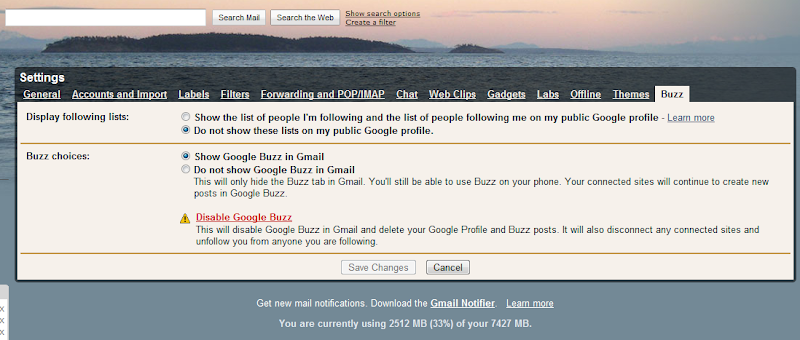
In Gmail's Settings, click on the Buzz tab, and you can delete the service from there altogether. Note - by doing this, you're severing any Buzz-related connections and posts.
Hide your followers from prying eyes
Everyone who has Buzz has to make some form of a profile in order to be followed or be a follower - or even Buzz. All your (public) buzzes are made available on your profile - but you can tweak some information on that.
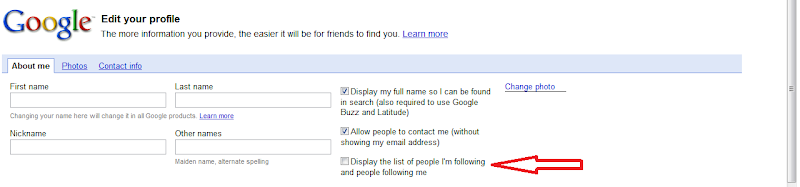
Head over to your profile and disable the "Display the list of people I'm following and people following me" option.
There are a few other tips that you can take note of, but for now, these four items should help you do what you want with Buzz. Stay tuned for more later on.
Drag and drop the label in to your "hidden labels category"
This will stop highlighting any unread Buzzes in your Gmail account.

Turn off Buzz Completely from the bottom of the page
This will remove the Buzz integration (not permanently). It's a quick fix, and if you ever want to check it out again, you can - by turning it on.

Delete Buzz
In Gmail's Settings, click on the Buzz tab, and you can delete the service from there altogether. Note - by doing this, you're severing any Buzz-related connections and posts.
Hide your followers from prying eyes
Everyone who has Buzz has to make some form of a profile in order to be followed or be a follower - or even Buzz. All your (public) buzzes are made available on your profile - but you can tweak some information on that.
Head over to your profile and disable the "Display the list of people I'm following and people following me" option.
There are a few other tips that you can take note of, but for now, these four items should help you do what you want with Buzz. Stay tuned for more later on.
Subscribe to:
Posts (Atom)
Subscribe


 Posts
All Comments
Posts
All Comments